
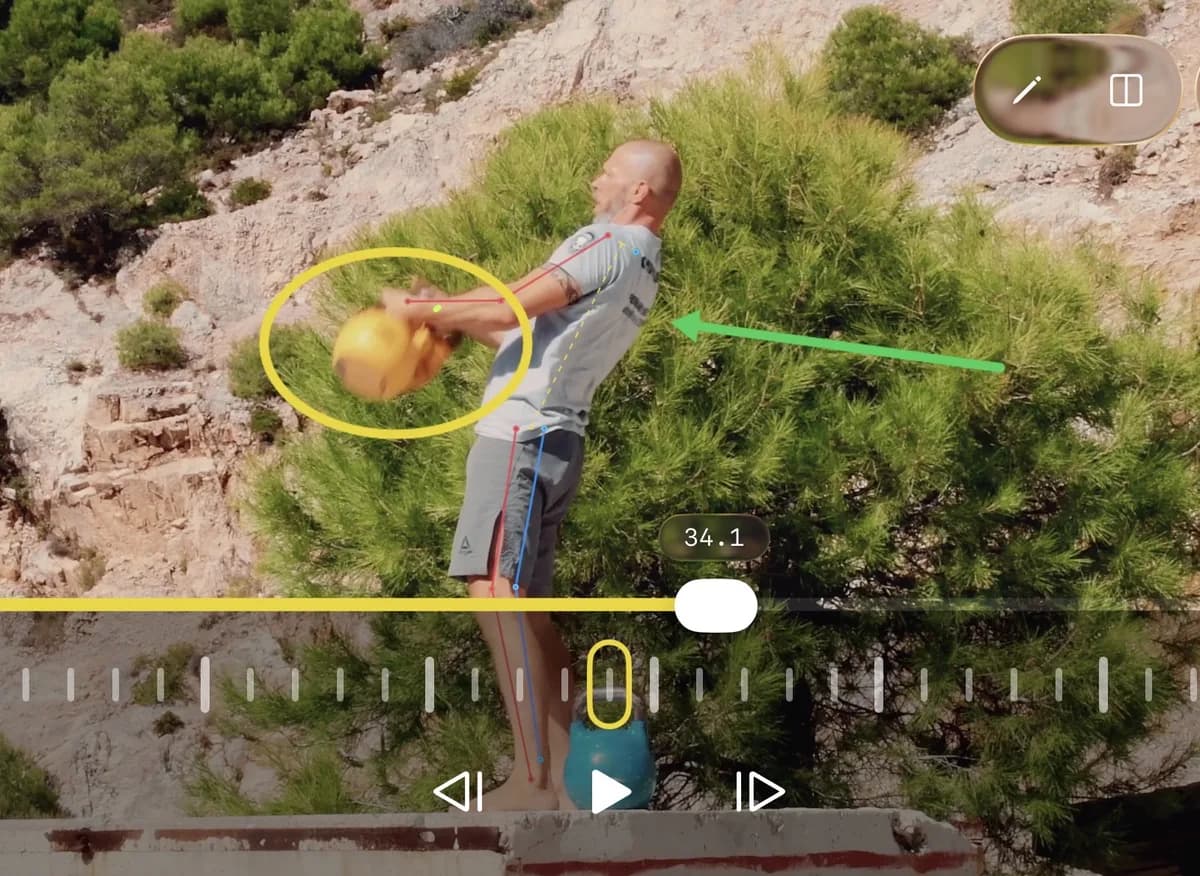
If you coach from video, athletes usually ask three versions of the same thing:
- how do I make better coaching videos?
- how do I draw lines on videos?
- how do I explain technique clearly?
The answer is not complicated.
Better coaching videos come from a better feedback workflow, not from fancy editing.
You need three things:
- a clear camera angle
- simple visual annotation
- one coaching point the athlete can act on immediately
That is what turns a clip into coaching instead of commentary.
How do I make better coaching videos?
To make better coaching videos, record from a useful angle, keep the clip short, review in slow motion, and focus on one visible problem at a time.
Most coaching videos get worse for predictable reasons:
- the camera angle hides the movement
- the coach talks about too many things at once
- the clip has no pause points or visual markers
- the feedback is abstract instead of tied to a frame
If you want the athlete to understand the video quickly, build the clip in this order.
1. Record from the angle that answers the question
Before you film, decide what you are trying to show.
If you want to coach sprint projection, a side view is usually more useful than a front view. If you want to coach knee tracking in a squat, a front or front-oblique angle may tell you more than a perfect profile.
The camera should reveal the error, not just document the rep.
For better movement review:
- keep the full body in frame
- avoid excessive zoom
- keep the phone stable
- repeat the same angle across sessions
That last point matters more than people think. Consistent framing makes comparisons easier, and comparisons are often where coaching becomes obvious.
2. Use clips that are short enough to review
A useful coaching video is usually brief.
One rep. One phase. One idea.
If the athlete has to scrub through 90 seconds of unrelated footage to find the point, the coaching friction is too high.
Short clips make it easier to:
- find the key frame
- compare one rep against another
- give precise feedback
- share the lesson with less confusion
3. Watch once at full speed, then slow it down
Full speed shows rhythm, intent, and coordination.
Slow motion shows positions, sequencing, and missed details.
Use both.
If you only use slow motion, you can lose the feel of the movement. If you only use full speed, you miss the positions that matter most. The best coaching videos use normal playback first and slower review second.
4. Stop on the frames that actually matter
Every movement has a few positions that explain most of the rep:
- setup
- loading or transition
- peak action
- finish or recovery
Those frames are where you should pause, annotate, and teach.
That is also where concepts like joint angle, center of mass, and range of motion become practical instead of academic. You are not chasing theory. You are showing what the athlete can see on screen.
5. Keep each video focused on one correction
The fastest way to make a coaching video worse is to turn it into a lecture.
A stronger format is:
- show the current rep
- mark the important position
- explain the one thing that needs to change
- give the cue for the next rep
For example:
"Your hips rise before your chest here. On the next rep, keep them moving together."
That is clearer than a long speech about posture, power, balance, intent, and confidence all at once.
Better coaching videos are simple, visual, and specific. If the athlete can identify the frame, the problem, and the next cue in under 20 seconds, the video is doing its job.
How do I draw lines on videos?
To draw lines on videos, pause on the key frame and use simple annotations like straight lines, arrows, circles, or angle markers to direct the athlete's attention.
The point of drawing on video is not decoration.
It is contrast.
Lines help the athlete see direction, shape, and position faster than verbal explanation alone.
Coaches usually draw lines on videos for four reasons:
- to show body alignment
- to show movement direction
- to compare the athlete to a target position
- to highlight what changed between reps
What kinds of lines should you draw?
The best annotations are the simplest ones:
- Straight lines to show posture, shin angle, torso angle, or bar path
- Arrows to show the intended direction of force or movement
- Circles to highlight the exact body part or error location
- Angle tools to show changes in joint position over time
If you are analyzing a sprint start, you might draw a line through the torso and another through the shin to discuss projection. If you are reviewing a squat, you might mark the bar path and use an angle marker at the knee or hip. If you are coaching a throwing action, you might use arrows to show sequencing and direction.
Where should you place the line?
Place the annotation on the frame that makes the point most obvious.
Do not draw across random frames just because the app allows it.
Good annotation depends on frame choice. The line matters, but the timing of the line matters more.
In practice, that means:
- pause at the frame where the error becomes visible
- draw only what supports the point you are making
- avoid cluttering the screen with five competing marks
When the screen gets busy, the teaching gets weak.
What should the line mean?
Every drawing should answer one of these questions:
- Where is the athlete now?
- Where should they be?
- Which direction should they move?
- What changed from the last rep?
If the line does not help answer one of those questions, it probably does not belong in the clip.
What app lets me draw lines on videos?
If you want to draw lines on videos for coaching, you need a video analysis app rather than a general video editor.
KineVision is built for this workflow on iPhone and iPad. You can pause a clip, scrub frame by frame, and use drawing tools to mark positions, direction, and technique errors directly on the video instead of trying to explain everything with words alone.
That matters because coaching annotation is different from content creation. The goal is not to make a polished social post. The goal is to make the movement easier to understand.
How do I explain technique clearly?
To explain technique clearly, anchor your feedback to one frame, use plain language, and connect the visible error to one action the athlete can try next.
Most unclear technique coaching has the same problem:
the coach understands the movement, but the athlete cannot tell what to do with the explanation.
Clear explanation comes from reducing complexity without losing accuracy.
Start with what the athlete can see
The athlete should not have to imagine the problem.
Show them.
Pause the clip and begin with a visible fact:
- "Your foot lands in front of your hips here."
- "Your chest drops forward at the bottom here."
- "Your elbow starts pulling before the trunk rotates here."
That is stronger than starting with a vague cue like "stay connected" or "use your legs better."
Visible coaching creates agreement before correction.
Use plain language before technical language
Technical terms can help, but they should clarify, not hide weak communication.
A good sequence is:
- name the visible issue in plain English
- explain why it matters
- give the next action
For example:
"You are opening up early here, so you lose force in the direction you want to go. Stay closed one beat longer on the next rep."
That is usually enough.
If the athlete needs more detail, then you can expand into timing, kinematics, or segment sequencing. But clarity should come first.
Explain one cause-and-effect relationship
Technique gets confusing when too many ideas are stacked together.
A better pattern is:
- position
- effect
- cue
Example:
- Position: your knee collapses inward on landing
- Effect: you lose stiffness and control
- Cue: keep the knee tracking over the middle of the foot
That structure is easy to understand and easy to coach.
Compare against a better rep
Sometimes the clearest explanation is contrast.
Show:
- the current rep vs a better rep
- the athlete now vs the athlete last month
- the athlete vs a model rep
Side-by-side comparison reduces the need for long explanation because the difference becomes visible immediately.
This is especially useful when coaching timing and movement pattern problems that are hard to describe in a single still frame.
End with a cue, not a monologue
If your explanation does not change the next rep, it was incomplete.
End with one instruction the athlete can try right away.
Strong cues are:
- short
- specific
- tied to the movement
- easy to remember under speed
Weak cues are broad and motivational without being actionable.
A clear technique explanation should answer three things: what happened, why it matters, and what to do next.
A simple coaching video workflow that works
If you want one repeatable process for better coaching videos, use this:
- record the rep from a useful angle
- watch once at full speed
- pause on two to four key frames
- draw one or two simple annotations
- explain the main error in plain language
- give one cue for the next rep
- compare against a better rep if needed
That workflow works across sprinting, lifting, jumping, golf, tennis, baseball, rehab, and general movement coaching because it follows the same logic every time:
show, simplify, correct.
FAQ
What makes a coaching video effective?
An effective coaching video shows the right angle, highlights the key frame, and gives one clear correction the athlete can apply immediately.
Should I use slow motion in coaching videos?
Yes, but not by itself. Watch the rep at full speed first for rhythm and intent, then use slow motion to inspect positions and sequencing.
How many annotations should I put on one video?
Usually one or two is enough. Too many lines, arrows, and circles make the screen harder to read and weaken the coaching point.
What is the easiest way to explain technique to an athlete?
Start with what is visible on screen, describe the effect of that position, and finish with one cue for the next rep.
Final answer
If you want to make better coaching videos, draw lines on videos, and explain technique clearly, the solution is the same:
make the feedback visual, focused, and easy to act on.
Record from the angle that reveals the movement. Pause on the frame that proves the point. Draw only the marks that help the athlete see it faster. Then explain one correction in plain language and give one cue for the next rep.
That is what helps athletes understand technique quickly.
That is what helps coaches communicate clearly.
And that is what makes video analysis useful instead of noisy.
Ready to get started? Download KineVision today from the App Store and rediscover the power of professional video analysis.
Comparing coaching apps? See KineVision vs OnForm or our Coach's Eye alternative, or KineVision vs Dartfish.