
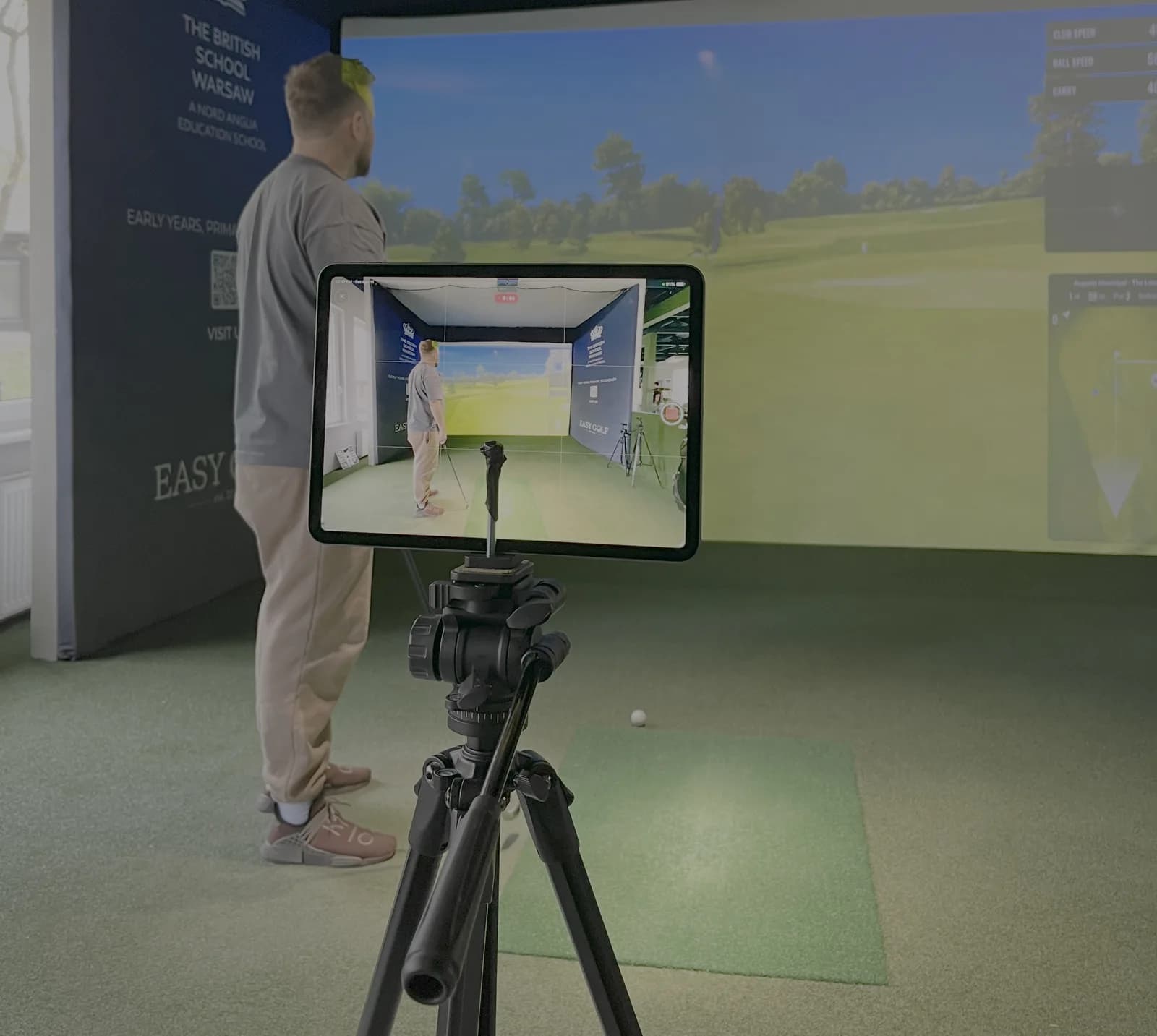
Sports video is often recorded as if the goal were documentation.
For analysis, the goal is different.
The purpose of capture is not simply to preserve an event. It is to preserve enough visual information to inspect timing, position, coordination, and movement quality with confidence. That requires a recording setup that prioritizes measurement quality over aesthetic convenience.
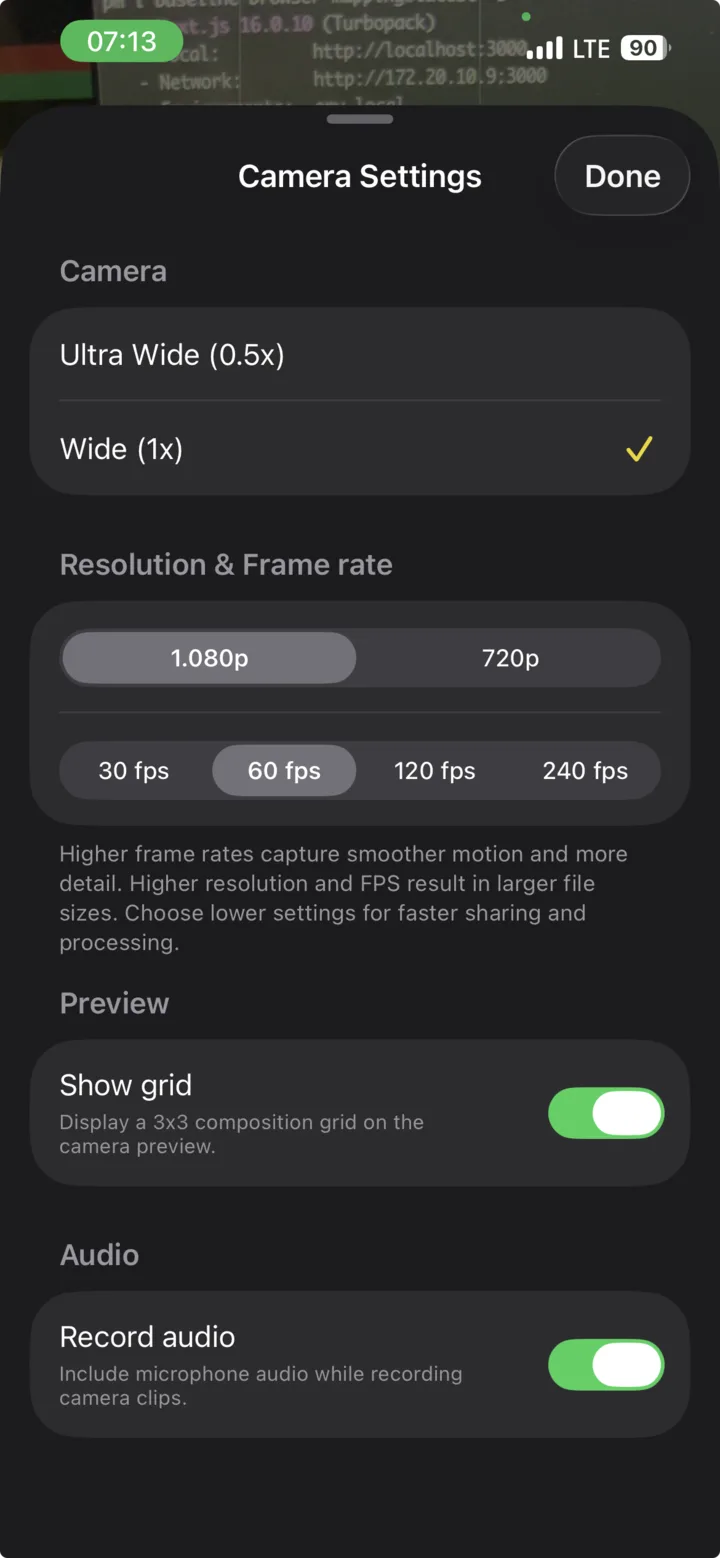
KineVision gives coaches and practitioners direct access to the capture variables that matter most on iPhone and iPad:
- Resolution
- FPS
- Grid
- Assign athlete
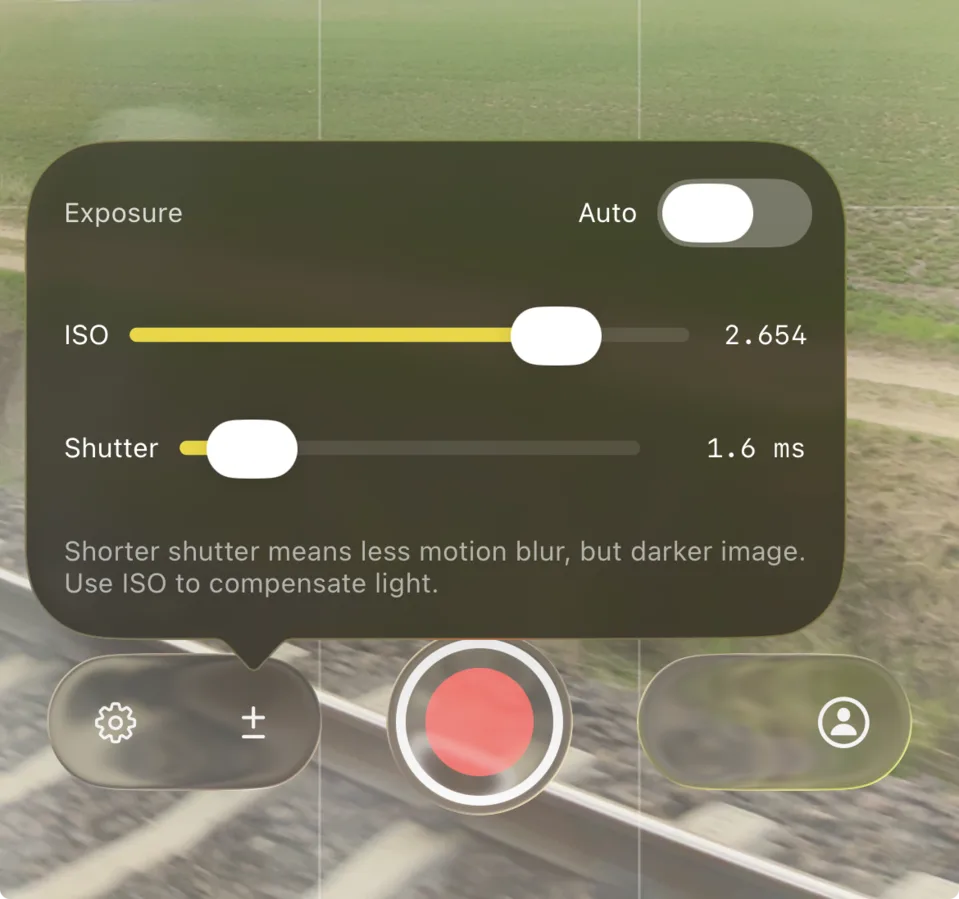
- Shutter speed
- ISO
Used correctly, these controls produce footage that is materially more useful for performance review than the default automated camera behavior on most devices.
The capture problem
In applied sport settings, video quality is usually degraded by one of three problems:
- insufficient temporal sampling
- excessive motion blur
- inconsistent framing between trials
All three reduce interpretability.
If the frame rate is too low, key events may occur between frames. If shutter speed is too slow, body segments and equipment edges become smeared within each frame. If camera position and framing change from trial to trial, comparisons become less reliable.
For coaches, therapists, and analysts, the consequence is simple: the video may still be watchable, but it becomes harder to trust for detailed review.
Why automatic camera behavior is a poor default for sport
Consumer camera systems are designed to produce visually pleasing footage under varied lighting conditions. Their primary objective is usually stable exposure and brightness.
That objective conflicts with sports analysis.
When light levels fall, automatic systems commonly reduce shutter speed to maintain a bright image. This improves perceived brightness, but it increases blur during fast movement. In other words, the camera protects exposure by degrading motion fidelity.
For general video, that tradeoff may be acceptable.
For technical analysis, it usually is not.
Auto shutter is typically the wrong control strategy for sports recording. It optimizes for brightness at exactly the moment when the analyst needs temporal clarity and clean freeze frames.
The three variables that define usable sports footage
Among all camera settings, three variables dominate the practical quality of sports video:
- frame rate
- shutter speed
- ISO
These interact to determine what the analyst can and cannot see.
Frame rate
Frame rate, or FPS, determines how frequently the device samples motion.
A higher frame rate gives the analyst more temporal snapshots of the movement. This is especially important when reviewing sprint contacts, striking actions, barbell transitions, throwing mechanics, or any movement phase that occurs rapidly.
In practical terms:
- higher FPS improves temporal detail
- higher FPS supports smoother slow-motion review
- higher FPS may require more light and careful exposure control
Shutter speed
Shutter speed determines how long each frame is exposed to light.
This is the primary determinant of motion blur.
- a fast shutter speed shortens exposure time and preserves edge definition
- a slow shutter speed lengthens exposure time and increases blur
If the intended use of video includes pausing, scrubbing, or frame-by-frame inspection, shutter speed becomes a first-order setting.
ISO
ISO controls sensor amplification.
In operational terms, increasing ISO makes the image brighter, but usually at the cost of more visible noise and reduced image cleanliness.
ISO does not freeze movement. It only compensates for limited light after other decisions have already been made.
That distinction matters because many users treat ISO as if it were a substitute for shutter speed. It is not.
Exposure is the result, not the priority
Exposure is best understood as the brightness outcome produced by the interaction of light, shutter speed, and ISO.
That means exposure should be evaluated after the core analytical requirements have been set.
For sport recording, the order of operations should usually be:
- define the frame rate required by the movement
- set shutter speed high enough to preserve useful motion detail
- raise ISO only to the minimum level needed for a usable image
This approach differs from typical consumer camera automation, which often treats brightness as the dominant objective. In analysis workflows, brightness is important, but only after temporal fidelity has been protected.

A practical frame rate standard
Frame rate should be selected according to the speed of the movement and the intended style of review.
For many coaching environments, the most useful default is:
- 60 FPS for general sports capture
- 120 FPS when the movement is especially fast or when slower playback and denser frame inspection are required
The advantage of 120 FPS is not abstract. It increases the chance that contact events, transition moments, or peak positions are captured in a way that remains visible during review.
The tradeoff is that higher frame rates often place greater demands on lighting and exposure management. If the recording environment is dim, simply selecting a higher frame rate without controlling shutter speed and ISO may not improve the footage in practice.
Shutter speed should be chosen for the movement, not left to chance
In sports capture, shutter speed determines whether a frame is analytically useful.
A practical field standard is:
- 1/250 to 1/500 for slower or less explosive drills
- 1/500 as a robust baseline for many general tasks
- 1/1000 or faster for sprinting, striking, throwing, rapid footwork, and fast equipment motion
These values are not aesthetic preferences. They are operational choices intended to preserve structure within the frame.
If the foot, hand, implement, or trunk contour dissolves under pause or scrubbing, the shutter speed was likely too slow for the task.
ISO should be treated as a support variable
Once frame rate and shutter speed are set, ISO becomes the variable used to recover a usable image.
The decision rule is simple:
- keep ISO as low as practical
- increase it only when the chosen shutter speed produces an image that is too dark for review
This is a controlled compromise. Higher ISO may add visible noise, but in analytical work, noise is often less damaging than blur.
A noisy frame can still preserve joint position, segment orientation, and timing cues. A blurred frame often cannot.
Resolution matters, but less than most users think
Higher resolution can improve detail retention, particularly when zooming or reviewing small spatial features.
However, resolution should not be confused with clarity.
For sports analysis, the ranking of importance is typically:
- sufficient frame rate
- sufficient shutter speed
- stable framing
- then higher resolution
If a recording must sacrifice either motion clarity or pixel count, motion clarity usually deserves priority.
Resolution is useful. Blur is destructive.
Grid supports repeatability
The grid control is not just a visual aid. It supports methodological consistency.
Consistent framing helps the operator:
- keep the horizon level
- preserve athlete position within the frame
- align lanes, platforms, and movement corridors
- reduce avoidable variation between trials
In repeated testing or longitudinal review, this matters. Small improvements in capture consistency can produce much cleaner side-by-side comparisons later.
Assign athlete before recording, not after
Organizational discipline is part of data quality.
The assign athlete feature should be used before or during capture so files are linked to the correct subject at the point of recording.
This reduces several common workflow failures:
- mislabeled clips
- slower retrieval during review
- difficulty comparing sessions
- avoidable manual sorting after training
From a lab perspective, this is basic metadata hygiene. From a coaching perspective, it saves time immediately.

Recommended capture protocol by environment
Outdoor daylight
This is the most forgiving condition for sports recording.
- use 60 FPS or 120 FPS
- set shutter speed between 1/500 and 1/1000 according to movement speed
- maintain ISO as low as practical
Outdoor light usually allows the strongest combination of temporal detail and clean exposure.
Indoor space with moderate lighting
This is where manual settings become critical.
- begin at 60 FPS
- target at least 1/500 shutter speed
- raise ISO carefully until the image is usable
If the image remains too dark at the shutter speed required, the limiting factor is the environment, not the app. Additional light or a change in position may be necessary.
Indoor space with poor lighting
These conditions expose the weakness of automatic shutter control most clearly.
The device will often attempt to preserve brightness by slowing exposure time. The result may look acceptable in playback but perform poorly under pause, scrub, or frame inspection.
In these environments:
- protect shutter speed as much as possible
- accept some ISO increase if required
- avoid assuming a bright image is a useful image
- consider whether the recording location is suitable for technical review at all
Operational sequence inside KineVision
For consistent capture, the sequence below is recommended:
- use assign athlete
- activate grid if repeatable framing is needed
- select resolution
- select FPS
- set shutter speed according to movement speed
- increase ISO only until exposure becomes usable
- record a short test clip and inspect paused frames before starting the full set
This final step is often skipped.
It should not be.
The validity of a sports recording setup is not determined by how the clip looks at full-speed playback. It is determined by whether the critical frames remain interpretable when the analyst stops the video.
A simple decision rule
When choosing among settings, use the following rule:
Prefer the setup that preserves movement information, even if it produces a less polished-looking image.
That principle resolves most camera decisions in applied sport.
Bright footage with blurred movement is often attractive but weak.
Slightly noisier footage with preserved positions is usually far more valuable.
For sports analysis, image brightness is not the endpoint. Interpretability is the endpoint. KineVision is most effective when its camera controls are used to protect what the analyst needs to see.
Conclusion
KineVision provides the essential controls for a serious mobile capture workflow on iPhone and iPad:
- resolution to manage detail
- FPS to manage temporal sampling
- shutter speed to control motion blur
- ISO to recover usable exposure
- grid to improve framing consistency
- assign athlete to preserve subject-level organization
The central recommendation is straightforward.
Do not let automatic shutter behavior determine the quality of sports footage.
Set the frame rate according to the movement. Set shutter speed according to the speed of the action. Use ISO only as support. Then verify the result on paused frames, not just while the clip is playing.
That is the difference between recording video and capturing analyzable movement.
Ready to get started? Download KineVision today from the App Store and rediscover the power of professional video analysis.
Comparing coaching apps? See KineVision vs OnForm or our Coach's Eye alternative, or KineVision vs Dartfish.